AI audit with Screaming Frog: Claude reads the data cleanly and invents the diagnosis
In short
Claude chews through large piles of crawl exports fast and separates confirmed facts from data gaps. But it turns measurable signals into proven causes and finished priorities that the data doesn't support. A word count under 200 became “thin content” and High priority, with no Search Console, no analytics, no check of search intent. Hand that audit to a client unchecked and you're selling guesses as a diagnosis. The value of the automation lives in the review layer behind it, and that layer belongs to a human. I also pushed the same crawl through a second model: both name the same numbers and both fail at the interpretation, only with different error profiles.
Discuss with AIClaude ↗ChatGPT ↗
I ran Screaming Frog over the website of a Swiss industrial company, dropped every export into a folder, and asked Claude to build a technical SEO audit from it. The model processed 136 pages cleanly, sorted the findings, and noted honestly where it was missing data. Then it stamped 85 pages as “too thin” and pushed them to High priority. It backed that up with nothing.
That is where it breaks. Not in reading the data. In interpreting it.
Three cases I take apart in full below: the Contao JSON-LD false alarm, the sorting algorithm for alt text, and the cost calculation. If you only want the method, jump to the review layer with its six statuses.
The setup, described honestly
No trick, no secret pipeline. I crawled with Screaming Frog in normal operation, exported the CSV files, and pulled the folder into a Claude Cowork project. Then one prompt, nothing more (I ran it in German for a German client; here in English for readability):
Run a technical SEO audit for the website [domain].
The CSV files are in the working folder.
Prepare:
1. An Excel file with all confirmed problems.
2. An action plan by priority.
3. A separate list of conclusions where the data isn't sufficient.
Industry: manufacturing.
Language: German.
Audience: the company's marketing lead.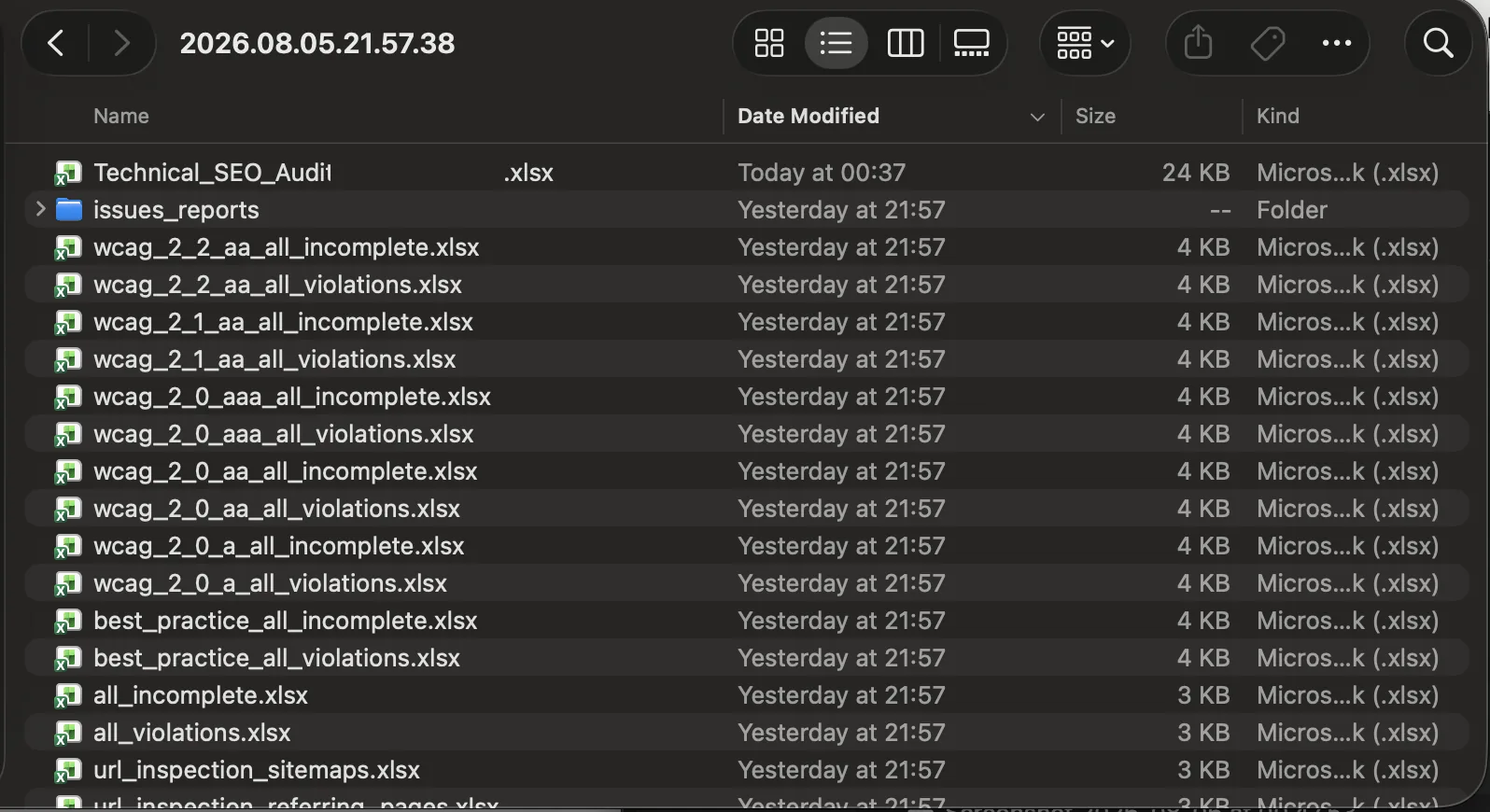
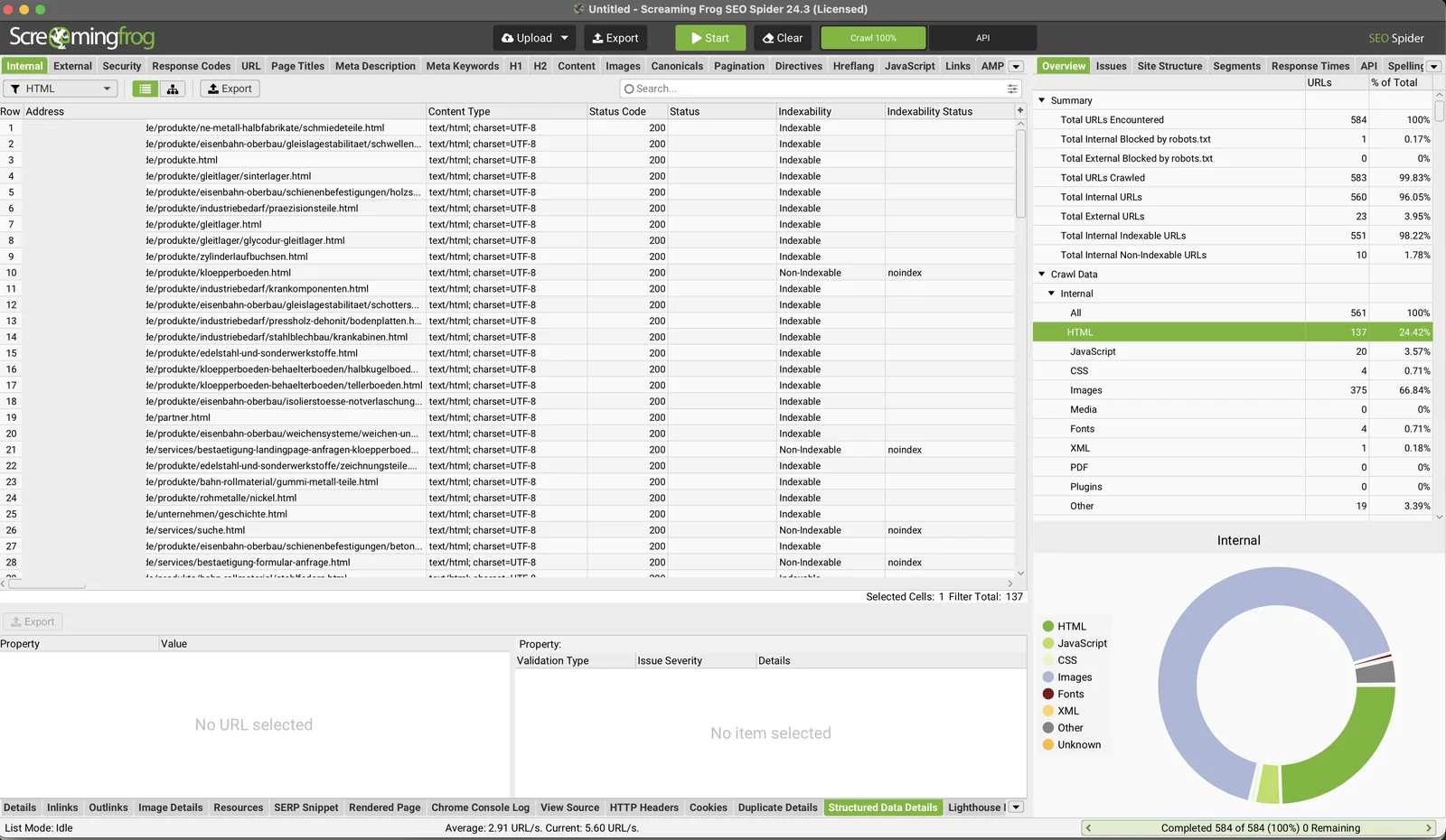
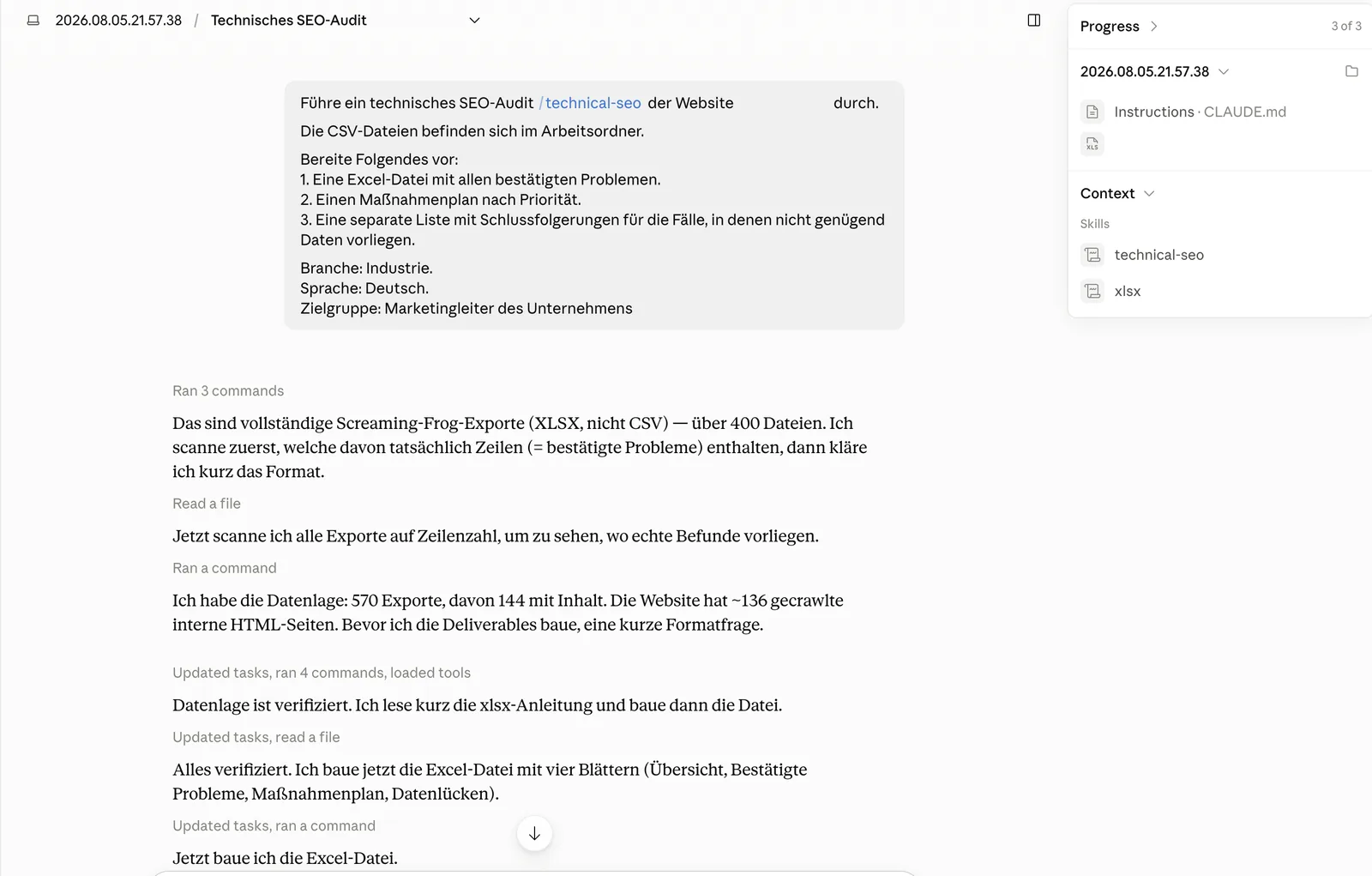
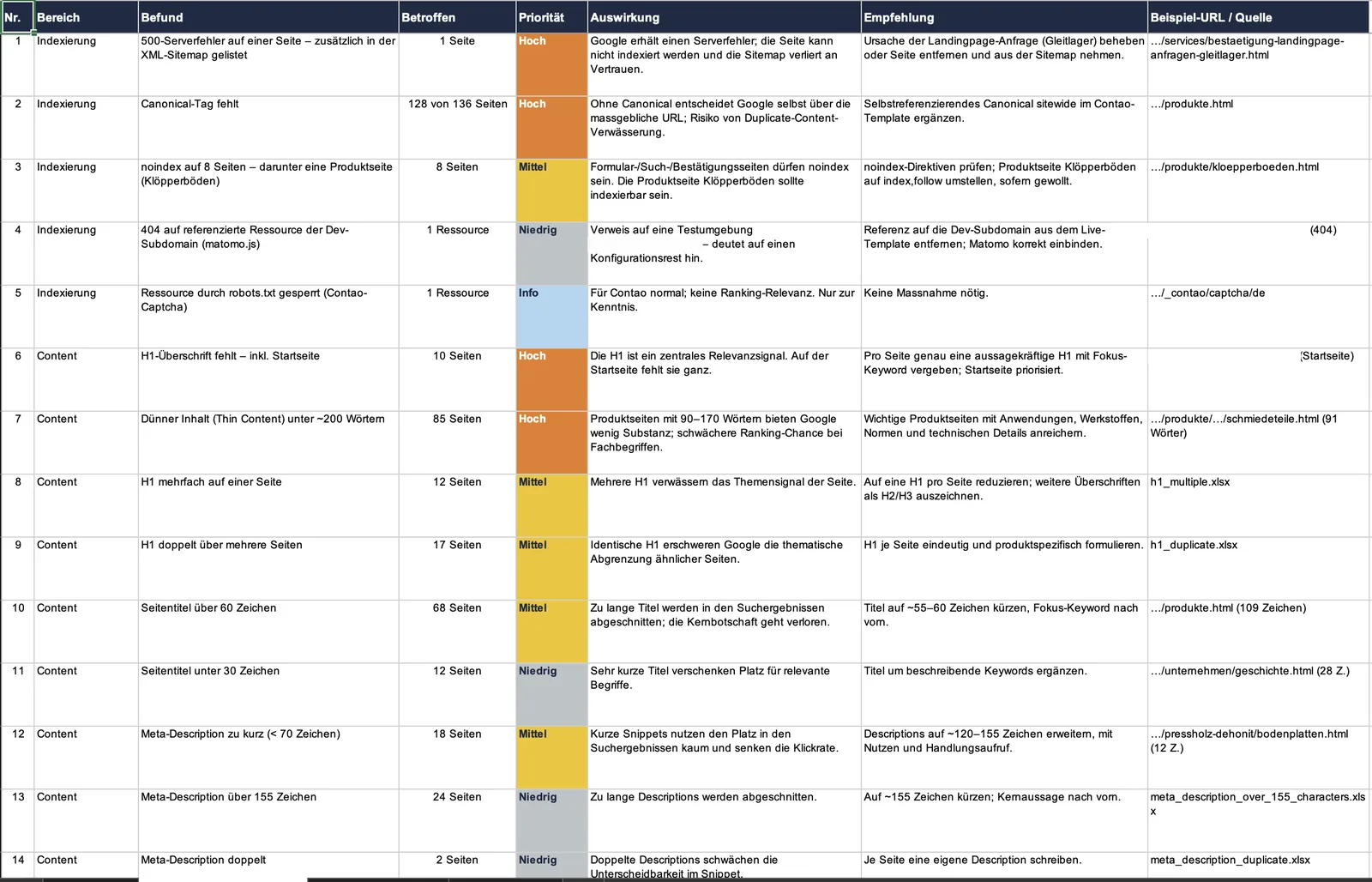
The result was an Excel workbook with four sheets: overview, confirmed problems, action plan, data gaps. One clarification belongs to this setup, because the two get mixed up. I used Claude in Cowork, where files sit in a project folder. That is not Claude Code, where you own the install, the permissions, the CLI commands, and the error handling yourself. Two different processes. Describe one and mean the other, and you mislead your readers.
What the model got right
Fair is fair. The data work was strong. Claude built an ordered structure out of a stack of raw exports that a marketing lead can actually read. It found real technical signals: a 500 server error on a page that also sits in the XML sitemap, and a reference to a matomo.js from a dev subdomain, a config leftover in the live template. Both are concrete, verifiable findings.
And here was the pleasant surprise: it created its own “data gaps” sheet. It says in black and white that there’s no Search Console data, no analytics, no Core Web Vitals, no backlink metrics, and that the French language version wasn’t in the crawl. I had left that out on purpose. The site is bilingual; I crawled only the German version under /de/. The model correctly noted that this half was missing. So it knew what it lacked. It just forgot that self-knowledge two sheets later.
The anchor metaphor: the eager intern
Picture a talented intern. He gets through in an hour what would take you a day. He sorts, counts, tabulates, flawlessly. And then he says, in a firm voice: “These 85 pages rank worse, we need to expand them.” Ask him how he knows, and the room goes quiet. He saw the number and built a story from it, because a story sounds more convincing than a question mark.
A model does the same. It fills the gap between fact and diagnosis with a plausible phrasing. And plausible is dangerous, because it feels right.
Five rules Claude invented
Behind every questionable recommendation I reconstructed the hidden rule the model decided by. Not to put it on trial, but because you can only fix a rule once you’ve named it.
1. The 200-word threshold
Claude flagged 85 pages as “thin content” for falling under about 200 words, and assigned High priority on the grounds that such pages have weaker ranking chances for technical terms. The rule behind it:
word_count < 200 -> thin content -> worse ranking -> High priorityThe jump from a measurable fact to a diagnosis isn’t covered. Google explicitly names no preferred word count for a page; what matters is whether the content is enough for the user. On a B2B product page, 120 words with the right specs can be complete. Whether these pages get impressions, which terms they rank for, and whether they’re actually losing position was unknown, because there was no Search Console in the dataset. The model had noted exactly that on its own “data gaps” sheet.
A check Claude didn’t run makes it sharper. All 85 short pages link to the same four sitewide PDFs: two versions of the terms of sale, two ISO certificates. Product-specific data sheets? None. So the interesting question was why these pages offer no technical material of their own, not whether they clear an arbitrary word mark.
The corrected rule treats word count as what it is: a reason to check, not proof.
word_count < 200  ->  candidate for manual review

Don't call it thin content until you've settled:
  page type and purpose · search intent · completeness of required specs ·
  distinctness from neighbouring pages · GSC (impressions, position, clicks) ·
  traffic, conversions, commercial value

If that data is missing:  status = needs_manual_review, priority = unconfirmed
2. A missing canonical is automatically High
On 128 of 136 pages a canonical tag was missing. Claude read this as a risk of duplicate-content dilution and recommended rolling out a self-referencing canonical sitewide, High priority. The missing tag is verified. Its effect isn’t. Without a canonical, Google picks the primary URL itself and treats the tag as a hint, not an obligation. Whether there’s a real duplicate problem here should have been shown with alternate URLs, parameters, or protocol variants. None of that was on the table. The recommendation is sensible as hygiene, but it isn’t High priority without demonstrated harm.
3. Fixed length limits for title and meta
The model set hard thresholds: title over 60 or under 30 characters, meta description under 70 or over 155. It attributed a falling click-through rate to short descriptions. Except: you can’t see click-through rate without Search Console, and there wasn’t any. Google names no fixed length limit; what shows up in the results depends on device and query, and the snippet text can be drawn from the page itself. A length filter is fine for triage. As proof of a snippet problem, it’s useless.
4. All 364 images without alt text in one bucket
364 images without alt text, one bulk finding, High priority. Alt text matters, no argument, for accessibility and image search. But an alt text isn’t an alt text. Decorative images need an empty alt="", not a keyword description. Without sorting the images first into informative, product, functional, and decorative, “fix the same error 364 times” is a fake task. The number sounds dramatic. It doesn’t describe 364 equivalent problems. How to turn that one number into clean work packages I show further down as its own algorithm.
5. A parse error becomes a delete instruction
The most instructive case. Claude found a JSON-LD parse error on all 136 pages, tied it to a Contao-internal vocabulary (@context schema.contao.org), and recommended removing that block or replacing it with standard Schema.org types. On the “data gaps” sheet it stated at the same time that the concrete rich-result error wasn’t actually established.
I read the raw exports against each other. The aggregated report shows one error per page. The detail export shows zero rich-result errors for those same pages and extracts Schema.org types like BreadcrumbList and WebPage alongside the Contao triples, all without a local error. The actual error text is missing from the export. So you can’t localise the cause. Which means: don’t delete it, and don’t wave it off as a false alarm. The honest status reads unresolved_conflict. First pull the JSON-LD of a sample page, reproduce it in a schema validator, separate a syntax error from an unsupported type, check key pages in the Rich Results Test. Only then a decision that changes a CMS template.
A recommendation that touches a template is expensive. Basing one on an error your own dataset can’t localise is the difference between advice and guessing. This case is instructive enough that I take it apart in full below.
The Contao case in full: when a “parse error” isn’t broken markup
The JSON-LD case deserves its own section, because it shows the whole mechanism of this error type: a real tool signal, a wrong cause, a dangerous recommendation. Short version first: Claude flagged the Contao-native JSON-LD graph on all 136 pages as an error and recommended removing it or replacing it with Schema.org types. The flag itself wasn’t invented, the pages really do sit in the Screaming Frog Parse Errors export. The break came one step later. The model took a limit of the validator, hit on a remote vendor-owned @context, for a CMS defect, and proposed a potentially harmful fix. The opposite is right: keep the Contao graph, check the public Schema.org markup separately, and add Organization, Product, or BreadcrumbList as its own graph, not as a replacement for the CMS metadata.
What the audit claimed exactly
On the “confirmed problems” sheet, finding no. 22:
| Field | Value in the audit |
|---|---|
| Area | Structured data |
| Finding | JSON-LD parse error on all pages |
| Affected | 136 pages |
| Priority | Medium |
| Explanation | Alongside Schema.org the site emits a Contao-internal vocabulary with @context schema.contao.org that validators flag as an error |
| Recommendation | Remove the internal Contao JSON-LD block or replace it with Organization, Product, BreadcrumbList |
| Source | structured_data_parse_errors.xlsx |
In the action plan this became its own medium-priority task: “Clean up JSON-LD: remove the Contao vocabulary, ship valid Schema.org.” On the “data gaps” sheet the same audit admits at the same time that no concrete Google rich-result errors were found and key pages should be checked separately in the Rich Results Test. So Claude didn’t hallucinate the flag, it carried over Screaming Frog’s classification. The error isn’t in capturing the signal. It’s in the cause diagnosis, the priority, and the proposed fix.
What the raw exports show
To check, I pulled the source files from the same dataset the audit rests on: the exports for parse errors, validation errors, the full inventory, the detail report, and the rich-result features.
The parse-errors export holds 136 URLs, all pages of the German version. For every row:
| Metric | Result |
|---|---|
| Pages in the export | 136 |
Errors = 1 | 136 |
Rich Result Errors = 0 | 136 |
Rich Result Warnings = 0 | 136 |
Rich Result Features = 0 | 136 |
Every row also has structured data types recognised, among them BreadcrumbList, DigitalDocument, ImageObject, ListItem, Page, and WebPage.
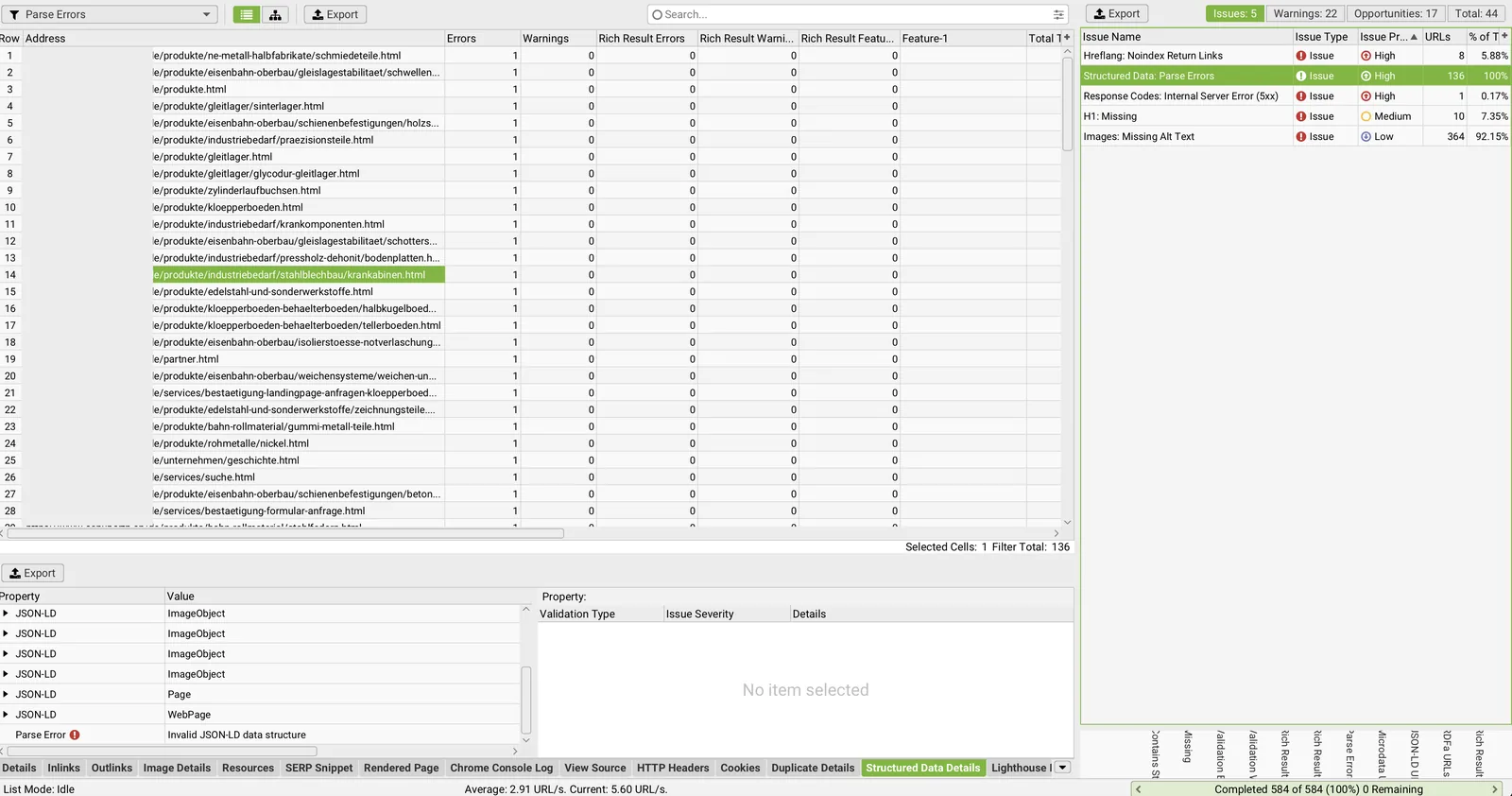
The validation-errors export holds only the header row. Not a single page with a standalone Schema.org or Google validation error. That’s an important terminology difference in Screaming Frog: validation errors are breaches of the Schema.org vocabulary or of Google’s rich-results requirements; parse errors are cases the tool classifies as “failed to parse correctly.” That split is in the Screaming Frog documentation, and the vendor describes parse errors explicitly as URLs whose structured data “failed to parse correctly,” with the advice to check JSON-LD additionally via the JSON-LD Playground or the Schema Markup Validator (Structured Data: Parse Errors).
The strongest counter-evidence is in the detail report. Despite the parse-error status, Screaming Frog converted the Contao graph into RDF triples successfully. For a product page the export contains:
rdf:type                              https://schema.contao.org/Page
https://schema.contao.org/fePreview   false
https://schema.contao.org/noSearch    false
https://schema.contao.org/pageId      168
https://schema.contao.org/protected   false
https://schema.contao.org/title       Product page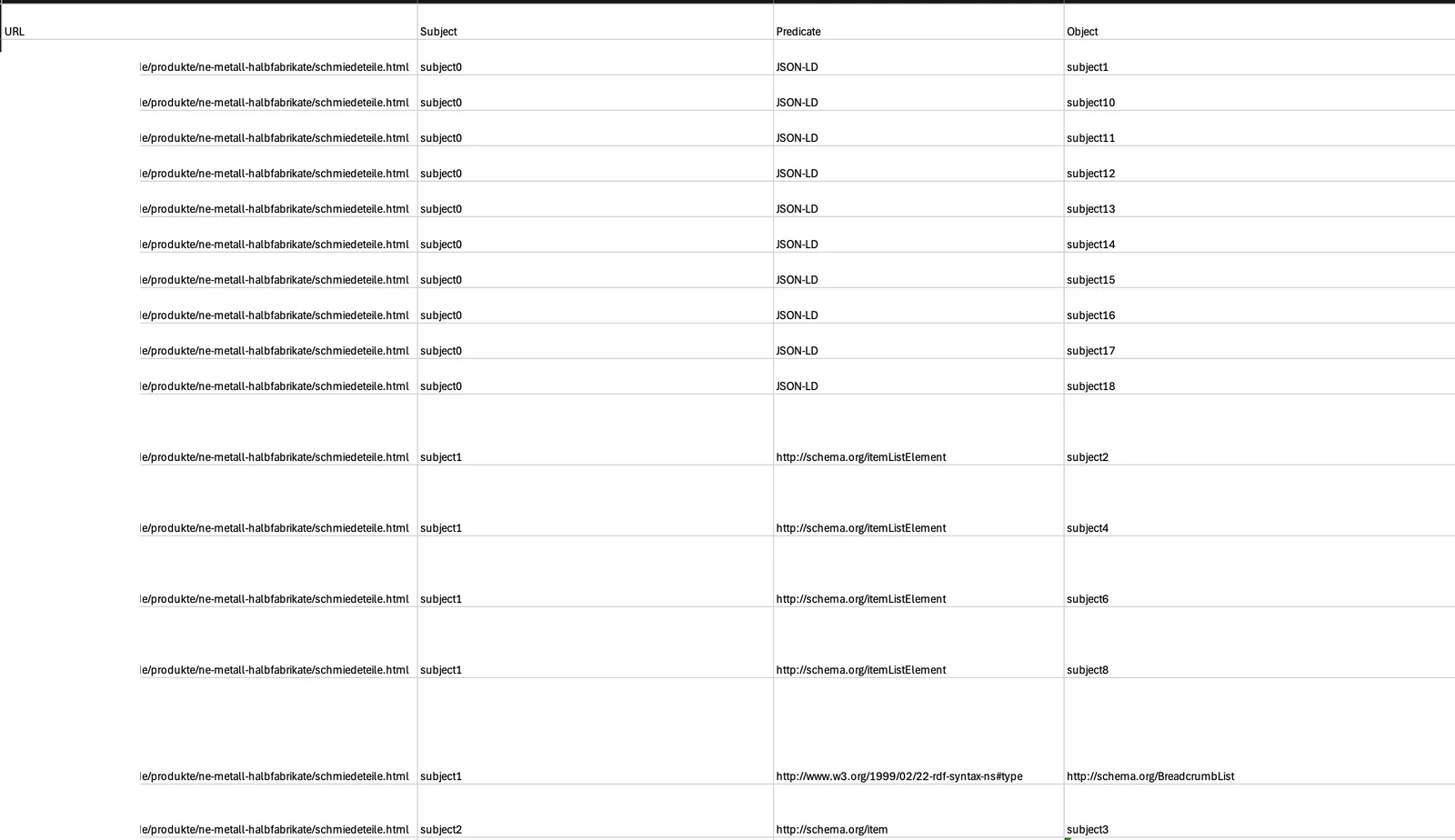
So the tool could find the JSON-LD, recognise the Page type, resolve the short property names to absolute IRIs, extract the values, and keep processing the neighbouring Schema.org graph. That doesn’t look like an ordinary JSON syntax break, no missing bracket, no unclosed quote. It’s better described as a limit of a particular validation mode when handling a remote, vendor-owned context.
How the Contao service graph is built
Here’s a normalised, readable form of the extracted data, cross-checked against the official Contao demo. This isn’t a verbatim copy of one page’s raw HTML, but an equivalent representation:
<script type="application/ld+json">
{
  "@context": "https://schema.contao.org",
  "@graph": [
    {
      "@type": "Page",
      "title": "Product page",
      "pageId": 168,
      "noSearch": false,
      "protected": false,
      "groups": [],
      "memberGroups": [],
      "fePreview": false,
      "searchIndexer": ""
    }
  ]
}
</script>
Depending on the Contao version and page configuration the fields can vary; older or shortened examples drop the @graph. Both forms use the same principle: the @context defines what Page, pageId, noSearch, protected, and fePreview mean in the Contao vocabulary.
At the time of checking, https://schema.contao.org/ answered with 200 OK and Content-Type: application/ld+json. The document holds its own @context linking the CMS fields to full IRIs and XSD types:
{
  "@context": {
    "xsd": "http://www.w3.org/2001/XMLSchema#",
    "contao": "https://schema.contao.org/",
    "Page": { "@id": "contao:Page", "@type": "@id" },
    "pageId": { "@id": "contao:pageId", "@type": "xsd:integer" },
    "noSearch": { "@id": "contao:noSearch", "@type": "xsd:boolean" },
    "protected": { "@id": "contao:protected", "@type": "xsd:boolean" },
    "fePreview": { "@id": "contao:fePreview", "@type": "xsd:boolean" }
  }
}
So the line "@context": "https://schema.contao.org" is not a syntax error. The JSON-LD 1.1 specification allows exactly that for @context: null, an IRI reference, a local context definition, or an array of those. External context documents and how to load them are explicitly foreseen in the standard.
Why Contao emits this data
The service graph isn’t just “something for internal scripts.” The consumer is named concretely: Contao’s server-side internal search.
The DefaultIndexer reads the graph with context https://schema.contao.org/ and type Page out of the HTML. Without pageId the indexer can’t identify the page. searchIndexer = never_index forbids adding it to the internal search, fePreview = true forbids indexing the preview page, protected and groups govern the indexing of protected pages and group access, title serves as the title of the indexed page. If a matching graph is missing, the indexer produces the diagnostic state No JSON-LD found. The SearchIndexListener and the Contao crawler read searchIndexer from the same schema.contao.org/Page graph to decide whether a page is indexed, skipped, or a previous entry removed. The ContaoPageSchema class sets the context, the type, and the service fields.
Removing the block doesn’t necessarily break the layout or the site’s JavaScript. But it can strip pageId and other metadata from the built-in indexer, change the indexing decision in the internal search, disturb the handling of protected pages and groups, affect the exclusion of the preview from the search index, and produce warnings or omissions in the indexer. So the “remove the block” recommendation demands proof that the Contao search is switched off and no other component uses this graph. The original audit has no such check.
Why different validators answer differently
The word “validity” hides several independent checks. Mixing them is what produces the false recommendation:
| Level | Question | Result for the Contao graph |
|---|---|---|
| JSON syntax | Can brackets, strings, numbers, commas be parsed? | Yes |
| JSON-LD syntax | Are @context, @type, @graph, and a context IRI allowed? | Yes |
| Context resolution | Can the processor load schema.contao.org? | Depends on the tool and its network policy |
| Schema.org compatibility | Do Page, pageId, fePreview belong to the Schema.org vocabulary? | No, that’s Contao vocabulary |
| Google Rich Results | Is the graph a supported rich-result type? | No |
| Google indexing | Can the HTML page be indexed? | This check doesn’t answer that |
“Not supported for rich results” turns into “invalid JSON-LD” and from there into “must be removed.” Three different statements, thrown into one pot.
What the Schema.org validator actually reports
I checked the Contao block through validator.schema.org. The result looks paradoxical: the entity Page was extracted, inside the entity card it showed 0 errors / 0 warnings, and separately a 1 uncategorized error appeared. The message explained that the parser doesn’t understand this @context segment, doesn’t support loading remote foreign JSON-LD contexts, and recommends the known https://schema.org/ or a local context. That isn’t a hidden Contao flaw, it’s a documented limit of the tool. The Schema.org Markup Validator documentation says outright that the validator is focused on Schema.org and doesn’t load or interpret other URLs in the @context.

Put precisely: the validator shows an error of its own parser for an unsupported remote context. That signal doesn’t prove the JSON or JSON-LD is syntactically broken. Calling it “just a warning” would be wrong too, the interface returns an error. But the semantics of that error is a limit of scope, not a break of JSON grammar.
What the Google Rich Results Test shows
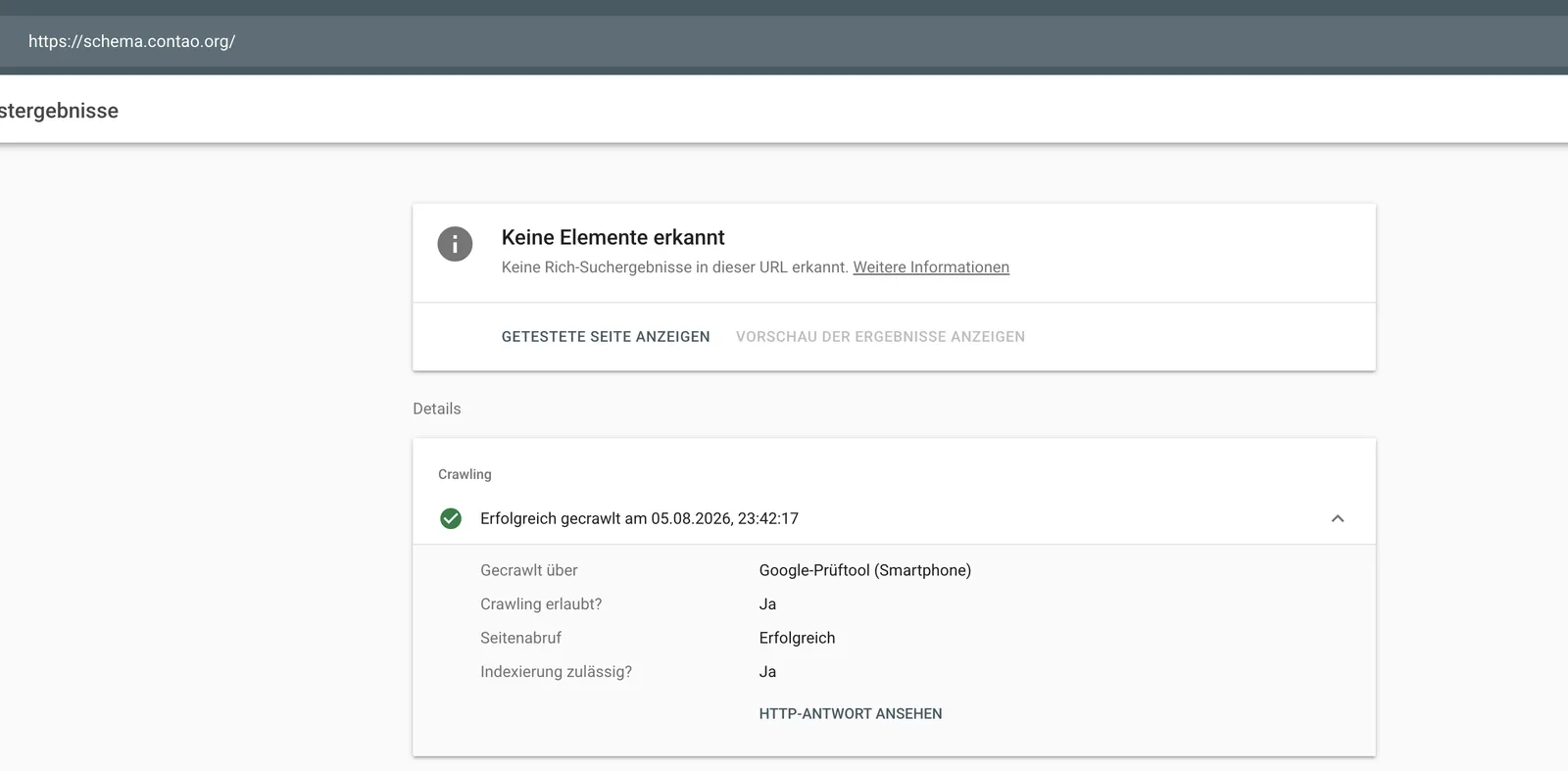
Check the URL https://schema.contao.org/ in the Rich Results Test, that is the context document itself and not an HTML product page, and Google reports: “No items detected. No rich results detected on this URL.” That means only that no rich-result-supported type was found under the checked URL. It doesn’t equal a JSON syntax error, an indexing ban, a penalty, or proof that no other Schema.org graphs exist on the HTML page. Google distinguishes the states “No items detected” and “Structured data with syntax errors detected” in the Rich Results Test help. The test only checks types Google supports; a valid vocabulary that takes part in no rich-result feature is simply ignored.
Where exactly Claude went wrong
The model got four things right: it found a systematic signal (one error on each of the 136 pages), tied the repetition to the CMS template rather than a single page, named schema.contao.org as the source of the validator incompatibility, and noted the absence of a concrete Google rich-result error.
The rest was wrong. It equated the tool status with a markup defect, though one row in the parse-errors export doesn’t prove the JSON is broken by the standard. It didn’t reconcile the result with the detail export, where the same Screaming Frog extracts the Contao graph into clean RDF triples. It didn’t check the CMS specifics, though the Contao source code shows the graph is read by the internal search indexer. It proposed a destructive fix that can change internal indexing. It mixed up different purposes, because Organization, Product, and BreadcrumbList don’t replace the service Page graph. And it set the priority too high, though there was no demonstrated effect on indexing or ranking and the rich-result errors in the dataset are zero.
So the precise criticism isn’t “Claude invented an error,” but: Claude carried over the Screaming Frog flag correctly, then without an independent check took the parser’s limit on a vendor-owned remote context for a CMS defect, and proposed replacing the service graph with public Schema.org markup that carries different semantics.
Why general LLMs lean toward this conclusion
Without Claude’s reasoning log the exact internal cause can’t be proven. What follows is an explanatory model, not a fact. In SEO examples @context is almost always https://schema.org; an unusual domain next to the words “parse error” raises the odds of the templated answer “replace with Schema.org.” A model can throw JSON validity, JSON-LD validity, a term’s existence in Schema.org, Google rich-results support, and SEO priority into one category, though those are five different checks. If the tool or model doesn’t load https://schema.contao.org/, then Page, pageId, and fePreview stay unknown, and unknown gets turned wrongly into invalid. The filename structured_data_parse_errors.xlsx reads like a diagnosis already made, so the model doesn’t return to the raw HTML, the spec, and the detail export. And the audit format demands a recommendation: if the cause hasn’t been investigated, an LLM often picks the visible action “remove” or “replace” instead of the correct do_not_raise or “needs CMS-specific review.”
The right check methodology
These eight steps are the copyable artifact of this case:
- 1
Separate the signals
Parse Errors ≠ Schema.org Validation Errors ≠ Google Rich Result Errors ≠ missing Rich Result Features.
Here: only the parse export filled · validation empty · rich result zero
- 2
Extract the triggering <script> block
From the raw HTML: Contao service graph, WebPage, BreadcrumbList, image/document – or a real foreign block.
- 3
Check JSON as JSON
Open strings, trailing commas, duplicate keys, wrong escaping, unclosed arrays/objects.
- 4
Check JSON-LD independently of Schema.org
A JSON-LD 1.1 processor or the JSON-LD Playground with remote-context resolution.
- 5
Check context reachability
HTTP 200, Content-Type application/ld+json, valid top-level @context, no redirect to HTML, CORS if relevant.
- 6
Validate the public Schema.org graph separately
WebPage, BreadcrumbList, Organization, Product.
- 7
Clarify the CMS function before removing
Internal search active? Protected pages/groups? Crawler/indexer active? Extensions reading the graph?
- 8
Classify the result
status: tool_limitationseo_severity: noneimplementation_action: do_not_removefollow_up: validate public schema.org graph separately
Parse Error ≠ Validation Error ≠ Rich Result Error ≠ missing Feature
The corrected audit row
Here’s the replacement for the wrong finding no. 22, ready to drop in:
| Field | Corrected version |
|---|---|
| Area | Structured data |
| Finding | Screaming Frog reports a JSON-LD parse error on 136 pages for the Contao-native context schema.contao.org. The Contao graph is still extracted successfully in the detail report. No Google rich-result errors found. |
| Affected | 136 pages |
| Priority | Info / do_not_raise |
| Impact | Compatibility message of the validator; no demonstrated syntax, indexing, or ranking error. The graph holds metadata for internal Contao functions, mainly search indexing. |
| Recommendation | Don’t remove the Contao JSON-LD and don’t convert it to Schema.org types. Add publicly relevant Schema.org data like Organization, Product, or BreadcrumbList as a separate graph if needed, and validate it independently. Treat only real syntax errors inside the respective blocks as a technical error. |
| Evidence | Parse-errors, validation-errors, and detail export from Screaming Frog; Contao core source |
The architecturally correct implementation
It’s wrong to replace the service graph with @context https://schema.contao.org by a marketing graph with @context https://schema.org and @type Product. They have different consumers and different meanings. What’s right is two independent graphs side by side:
<!-- CMS service data -->
<script type="application/ld+json">
{
  "@context": "https://schema.contao.org",
  "@graph": [
    { "@type": "Page", "pageId": 168, "noSearch": false, "protected": false, "fePreview": false }
  ]
}
</script>

<!-- Public data for search engines -->
<script type="application/ld+json">
{
  "@context": "https://schema.org",
  "@graph": [
    { "@type": "WebPage", "@id": "https://example.com/en/...#webpage", "url": "https://example.com/en/...", "name": "Product page" },
    { "@type": "BreadcrumbList", "itemListElement": [] }
  ]
}
</script>
This is an illustrative architecture, not finished markup for a specific page. The real properties have to match the page content and the requirements of the chosen Schema.org type.
Limits of this finding
Honesty about the evidence belongs here. The parse-errors export holds the flag but not the text of Screaming Frog’s internal exception; the cause is assigned to the Contao context by the whole picture (the audit’s wording, the repetition on all pages, the detail RDF export, the reproducible behaviour of the Schema.org validator). The normalised JSON-LD block is reconstructed from the extracted data; a byte-exact comparison would need the raw HTML of that day saved. The absence of rich-result errors guarantees no rich snippet, it only means this export holds no such errors. And you can’t claim removing the block necessarily breaks the whole site; what’s demonstrated is the narrower risk of changing or disturbing Contao’s internal search indexing. The possible causes of the LLM error are reasoned hypotheses, not access to Claude’s internal process.
364 images without alt text: a sorting algorithm instead of one lump number
The alt-text finding is the best example of how a big number hides a small question. Claude bundled 364 images without alt text across 887 embeds into one High task: add descriptive alt text with product and technical vocabulary. The number shows the size of the sample, not the number of texts you actually have to write. A missing alt attribute deserves a check, but the result of the check isn’t always a text. Per W3C the right solution depends on the image’s purpose in its concrete context: a decorative image gets an empty alt="", a functional image a text describing the action, an informative image a short meaning-equivalent, a complex diagram a short alt plus a full description alongside.
The key point: what you classify is every meaningful use of an image on a page. The file alone says too little, because the same file can be decorative in one context and informative or functional in another. And “no alt” isn’t the same as an empty alt:
<!-- Error: no alternative text defined -->
<img src="separator.svg">

<!-- Deliberate choice: image is decorative -->
<img src="separator.svg" alt="">
If the attribute is missing, a screen reader may read out the filename. An empty alt tells assistive tech to skip the image. Two different states that a lump finding blurs.
The algorithm in seven steps
First, the context of every embed, not just the image URL. Without the surrounding HTML snippet, the nearest heading, the caption, a parent <a> or <button>, the visible text inside it, the existing alt, title, aria-label, role, and a screenshot, a model only guesses from filenames. For a bulk change to the CMS that’s useless.
Then three questions in a fixed order. First: is the image inside a link, button, or other control? If yes, it’s potentially functional. Next check: does the control already have an understandable name without the image?
<!-- Icon supplements an already-labelled link: alt empty -->
<a href="/downloads/catalog.pdf"><img src="pdf.svg" alt=""> Download catalog as PDF</a>

<!-- Image is the only content of the link: alt describes the purpose -->
<a href="/downloads/catalog.pdf"><img src="pdf.svg" alt="Download catalog as PDF"></a>
For functional images the alt describes the result of the action, not the appearance. So alt="Search", not alt="Magnifier".
Second: does the user lose information if the image doesn’t load? If yes, it’s informative. A product photo, a component drawing, an assembly sketch, a logo that identifies a company or a certification. The alt carries the meaning in the page context, not a list of every visual detail.
<!-- Weak: says nothing about the purpose -->
<img src="part.jpg" alt="grey metal part on a white background">

<!-- Better: carries the product identity -->
<img src="part.jpg" alt="Plain bearing, GX series">
Third: does the image only repeat the text next to it? If the same information already sits in a caption, heading, or paragraph, the image can be decorative in this context. The icon next to “Sales, phone: …” needs no alt, the label already carries the meaning. For a product photo a name alongside is rarely enough, because the photo shows shape or finish.
Two special classes remain. Complex informative images, that is charts, maps, technical drawings, get a short alt plus a visible full description:
<figure>
  <img src="load-curve.png" alt="Permissible bearing load as a function of temperature">
  <figcaption>Up to 80 °C the permissible load is 12 kN, from 120 °C it drops to 7 kN. Full values in the table below.</figcaption>
</figure>
And special cases with their own rules: a logo as the only content of a home link needs a purpose alt like Home; text in an image belongs in real HTML, not in an overlong alt; a CAPTCHA must never get an alt that reveals the answer, and always goes to manual review; an inline <svg> has no alt at all, its name comes via <title> or aria-label; a product gallery tells its shots apart by useful detail instead of repeating the same name; and the alt is always written in the language of the page, never carried automatically between language versions.
The decision tree
alt="" – decorative within the control. The existing name is enough.
The alt text describes the action or purpose of the control – not the image itself.
alt="" – screen readers skip the image.
A short, carrying alt text that replaces the image information.
A short alt text plus a long description (e.g. in the surrounding text or linked).
If the context isn’t enough, or two classes are equally likely, the system doesn’t guess. The result is needs_human_review.
The output format
For bulk processing from Screaming Frog or a CMS export I return a structure that also carries the place of implementation, instead of a single Suggested Alt column:
| Field | Purpose |
|---|---|
page_url / page_language | where it was found and which language to write in |
image_url / selector | image and exact position in the DOM |
image_role | decorative, functional, informative |
complexity | simple or complex |
recommended_alt | "", text, or null if deferred or alt doesn’t apply |
recommended_implementation | alt, the control’s accessible name, <title>/ARIA for SVG, or a long description |
current_alt_state | missing, empty, present, or not_applicable |
evidence / reason / confidence | evidence, reasoning, value 0 to 1 |
needs_human_review | true / false |
implementation_scope | asset, component, page_instance |
implementation_scope is the most important entry for a CMS. asset means one text can safely go into the file metadata; component concerns a whole template; page_instance depends on the concrete use. That’s exactly what stops the error of a central alt from the media library landing automatically in every context.
The ready-made classification prompt
This is the copyable artifact of this section:
You are a specialist in web accessibility and technical SEO. Classify
every USE of an image on the page, not just the image file.

Goal: decide whether an image is decorative, functional, or informative,
and propose the correct alt implementation.

Input per use: page_url; page_language; image_url; HTML snippet with parent
elements; screenshot of the image and the surrounding block; nearest heading,
caption, and text; details of the parent link/button; visible text of the
control; alt, title, role, aria-label, aria-labelledby; computed role and
accessible name of the interactive parent; selector.

Rules:
1. Don't decide from filename, URL, or computer vision alone.
2. Determine the image's purpose in the page context first.
3. If the image is the only content of a control with no other name,
   then functional; the text describes action/purpose, not the icon.
4. If it sits in an already-labelled control with no added value,
   then decorative with alt="".
5. If information is lost without the image that the neighbouring text
   doesn't carry, then informative.
6. For informative, a short meaning-equivalent; don't start with "image"
   or "photo" unless the image type itself matters.
7. If the image only duplicates the neighbouring text with no own function,
   then decorative.
8. For a chart, map, diagram, complex drawing: image_role=informative,
   complexity=complex; give a short alt plus the place of the long description.
9. Don't add SEO keywords that don't belong to content/purpose. No stuffing.
10. Don't set the same alt automatically for all uses of one file.
11. If context is too thin or classification is ambiguous: needs_human_review=true,
    recommended_alt=null, name the missing data.
12. Return an empty alt as "", not null. null only if
    needs_human_review=true or alt is technically not applicable (inline SVG);
    then put the fix in recommended_implementation.
13. For inline SVG don't propose alt, use title/aria-label/aria-labelledby.
14. For CAPTCHA always needs_human_review=true.
15. Write alt in the language of the page; unknown language -> needs_human_review=true.
16. Before implementation_scope=asset, check that all uses of the file
    share the same role and need the same text.

Allowed values: image_role [decorative|functional|informative];
complexity [simple|complex]; current_alt_state [missing|empty|present|not_applicable];
implementation_scope [asset|component|page_instance].

Return only a valid JSON array, no Markdown, no comments.
A sample object from the result:
{
  "page_url": "https://example.com/products/bearing-gx.html",
  "page_language": "en",
  "image_url": "https://example.com/assets/gx-bearing.webp",
  "selector": "article.product figure img",
  "image_role": "informative",
  "complexity": "simple",
  "current_alt_state": "missing",
  "recommended_alt": "Plain bearing, GX series",
  "recommended_implementation": "Put the proposed text into the alt of this use.",
  "accessible_name_source": "none",
  "evidence": ["Image shows a specific product model", "Model not named in the caption"],
  "reason": "Without the image the identity of the shown product is lost.",
  "confidence": 0.91,
  "needs_human_review": false,
  "implementation_scope": "page_instance"
}
Quality control before writing to the CMS
Even a good prompt doesn’t write to Contao automatically. First deduplicate files, but keep the uses. Then classify automatically. Then check the risky cases: all functional, all complex, all low confidence. Then set the place of implementation. Then recrawl after writing and check the accessible names of the controls. The routing follows simple rules:
| Condition | Action |
|---|---|
decorative, confidence >= 0.95, no link/button | bundle by component, batch approval |
functional, no accessible name | mandatory: human review before release |
informative, simple product context, confidence >= 0.90 | editorial batch check |
complexity=complex | manual only: short alt and long description |
| same file, different roles | no central alt from the media library |
| no context or confidence < 0.85 | don’t change, send to manual classification |
A plain SEO recrawl isn’t enough as acceptance. It confirms an attribute is there, not that it carries the right meaning. For that you need a screen reader or the accessibility tree inspector.
What that means for the cost calculation
The 12 to 18 hours and 1,440 to 2,160 € from the table below describe processing all 364 files as one block. After classification you count by real groups: decorative components times template time, functional uses times review time, simple informative times editorial time, complex images times the time for the long description, plus QA. That clears out two distortions. Decorative icons no longer go to a copywriter for “SEO text,” and functional or complex images don’t get auto-generated descriptions that hit neither the action nor the data. The value of the review isn’t in leaving the alt empty, it’s in sending each image class into the right workflow.
The finding that tells me the most: the report contradicts itself
Beyond the individual SEO rules, the workbook had a structural problem, and that was the real warning sign. The overview named 28 confirmed problem types; the detail sheet held 30 rows. The overview reported 6 findings at High or Critical; there were actually five at High and not a single Critical. The 500 error stood once as “High” and once as “Critical.” The sitemap counted as “clean,” while another sheet listed a 500 page in exactly that sitemap. hreflang got ticked off as correct, though I had deliberately left the French version out of the crawl and the model therefore had no counterpart to check at all.
The cause is in the workbook itself: no formulas. The sums and priorities were entered as fixed numbers, not computed from a single list. Each sheet came about on its own, and nobody reconciled them. The hidden rule at the architecture level:
Each sheet can be produced on its own,
sums and priorities can be typed in by hand.
An audit whose numbers contradict each other between cover and detail isn’t shippable yet, no matter how good the individual findings are. The fix is a single normalised list of findings as the source of truth, from which the overview and the action plan are computed. And a consistency check before the file leaves the building.
The review layer: six statuses instead of one priority column
Out of these cases grows a simple consequence. Every finding needs a truth status before it gets a priority. Not “how bad,” but first “how certain.” This table is the core of my correction and the artifact you can take with you:
| Status | Condition | Action |
|---|---|---|
confirmed | fact and technical consequence proven | into the action plan |
hypothesis | signal found, effect not proven | into the review section, not the plan |
data_gap | required data missing for the statement | name which data is needed |
unresolved_conflict | exports or checks contradict each other | no recommendation until reproduced |
web_hygiene | sensible, but outside SEO causality | to the responsible owner or the appendix |
do_not_raise | no action needed after checking | not into the client list |
This logic would have caught every one of these errors. Thin content would be data_gap instead of High. The JSON-LD block would be unresolved_conflict instead of “delete.” The missing security headers, which Claude wrote into the SEO backlog with counts from 415 to 559 URLs, would be web_hygiene and go to IT. Because those counts mix HTML documents with images and scripts, there aren’t 559 SEO pages, and Google doesn’t list CSP or X-Frame-Options as direct ranking signals.
The most important part of this list is the last row. Not raising a finding is a quality act, not a gap. An audit that reports every deviation isn’t a thorough audit. It’s a loud one.
When it’s worth it, and when it isn’t
It’s worth it when you run technical audits regularly and want to hand the same grunt work, the merging and formatting of dozens of exports, to the machine. The time you save goes into checking the diagnoses. That’s a good trade, because checking is the work a client pays a human for.
It’s not worth it when nobody with SEO experience reads the output. Then you don’t automate the analysis, you automate the production of confident errors. It’s just as unsuited for anything the model structurally can’t see: the content quality of a page, a reliable cause for traffic changes, the backlink profile, complex JavaScript states, pages behind a login. And one number I deliberately don’t name: how much time the automation saves. As long as I haven’t measured the same case cleanly against a manual audit on identical scope, any percentage would be a guess. I hold to my own rule and only diagnose once the data carries it.
What the errors cost, and what you’re allowed to claim honestly
The most expensive moment of an AI audit isn’t creating the report. It comes later, when an auto-collected signal becomes a task for a copywriter, a developer, or an SEO team without a check. That’s where budget appears. And that’s where it pays to calculate, cleanly split between what’s proven and what’s only a scenario.
I calculate with an assumed rate of 120 € per hour net, the price charged to a client by an agency. That isn’t the internal cost hour of a copywriter or a Contao developer. The time norms below are my assumptions, not data pulled from the audit, all figures net. Rebuild the calculation and you can swap the rates.
Work through the entire unchecked backlog as-is, and the sum looks like this:
| Task | Blind execution | Cost at 120 €/h | Expert review | Cost of the review |
|---|---|---|---|---|
| Thin content: 85 pages | 60–85 h | 7,200–10,200 € | 1.5–2.5 h | 180–300 € |
| Contao JSON-LD: 136 pages | 4–8 h | 480–960 € | 0.5 h | 60 € |
| Self-referencing canonicals: 128 pages | 1–3 h | 120–360 € | 0.5 h | 60 € |
| Title and meta description | 10–15 h | 1,200–1,800 € | 1.5–2 h | 180–240 € |
| Alt texts: 364 images | 12–18 h | 1,440–2,160 € | 1.5–2.5 h | 180–300 € |
| Security headers | 4–8 h | 480–960 € | 0.25 h | 30 € |
| Total | 91–137 h | 10,920–16,440 € | 5.75–8.25 h | 690–990 € |
Out of that come three numbers, and the whole trick is not to confuse them. This is the artifact a management team should see:
Level 1 - budget at risk:                 10,920-16,440 €
  What working through all six groups costs at the assumed rate.

Level 2 - maximum avoided cost:            9,930-15,750 €
  Budget at risk minus the review (16,440 - 690 and 10,920 - 990).
  An upper bound. Assumes the whole backlog was useless.

Level 3 - proven effect on the confirmed error:  420-900 €
  The Contao case: implementation 480-960 € minus review 60 €.
Only the third number can I tie firmly to a demonstrated audit error. The first two describe the size of the risk when nobody double-checks, not a proven loss. Sell the 15,750 € without that caveat as “the cost of AI hallucinations” and you make the same mistake the model made: a plausible big number with no evidence.
A look at the individual items shows why. The Contao case is the only clearly demonstrated misclassification, that’s where the effect is real. The thin-content item of 7,200–10,200 € is pure scenario, it holds only if someone misreads the number 85 as a writing brief and re-texts every page with no intent check. The canonicals aren’t a useless recommendation, only the High priority is debatable, so the 120–360 € aren’t damage. The length correction on title and meta is a heuristic: forcing them all into a character corridor mechanically can be pointless, an editorial rework of weak metadata isn’t. The alt texts are work that comes up, but only after classifying the images do you know which part of it was needless (decorative images need an empty alt=""). And the security headers are a real hardening task, they just don’t belong in the SEO damage and are set centrally on the server, not 559 times one by one.
A second, honest look at the time. On this exact run Claude maybe saved 45 minutes of structuring work, the review cost me about 90 minutes. At the rate that’s 90 € saved against 180 € of review, so 90 € of extra effort for this one report, plus model cost. That doesn’t mean the effort doesn’t pay off. It means the value doesn’t come from the saved prep, it comes from the more expensive wrong implementation the review prevents. That’s why I name these three levels together instead of claiming a tidy saving number.
Benchmark: two models, the same crawl
I didn’t stop at one run. The same Screaming Frog crawl, the same 136 pages, I pushed through a second model and compared the two Excel workbooks row by row. An honest limit up front: the labels “Claude Sonnet 5” and “Gemini 3.5” are my run names. The files themselves hold no model name, no version, no system prompt, no run ID. So the unit of analysis is two concrete files, not the model families as a whole. A generalisation would need repeat runs with an identical prompt and input.
The main finding first: the difference isn’t in the numbers. Both workbooks name the same 85 pages under the 200-word mark and the same 128 of 136 pages without a canonical. The break comes one step later, when the filter signal turns into a causal SEO claim and a finished task. And there the two runs showed different error profiles.
| Topic | First model (Claude) | Second model (Gemini) | Verified finding |
|---|---|---|---|
| 200-word mark | 85 pages thin content, High | 85 pages low content; the detail row admits “no minimum,” the plan still says “low quality” | number comes from the Screaming Frog filter, not a Google criterion |
| Canonical | 128 pages, High, sitewide | 128 pages, P2 in the row, High in the plan, “serious bug” in the dashboard | recommended, not required; prove real duplicates first |
| Contao JSON-LD | Medium; remove or replace the block | P1; Schema score 0/100, “0% rich-result chance” | tool limit, not a syntax error |
| Alt texts | High; fill product texts centrally in the CMS | P3; allows alt="" for decorative images | classification per use needed |
| Noindex | Medium; “if intended” | P1; “loss of revenue,” “0 organic leads” | intent and GSC data are missing |
| Dev resource (Matomo) | Low; config leftover | P1; security, performance, analytics, and GDPR risk | finding is real, the consequences unproven |
| Overall score | none | 58/100 plus categories, no formula | not reproducible without a method |
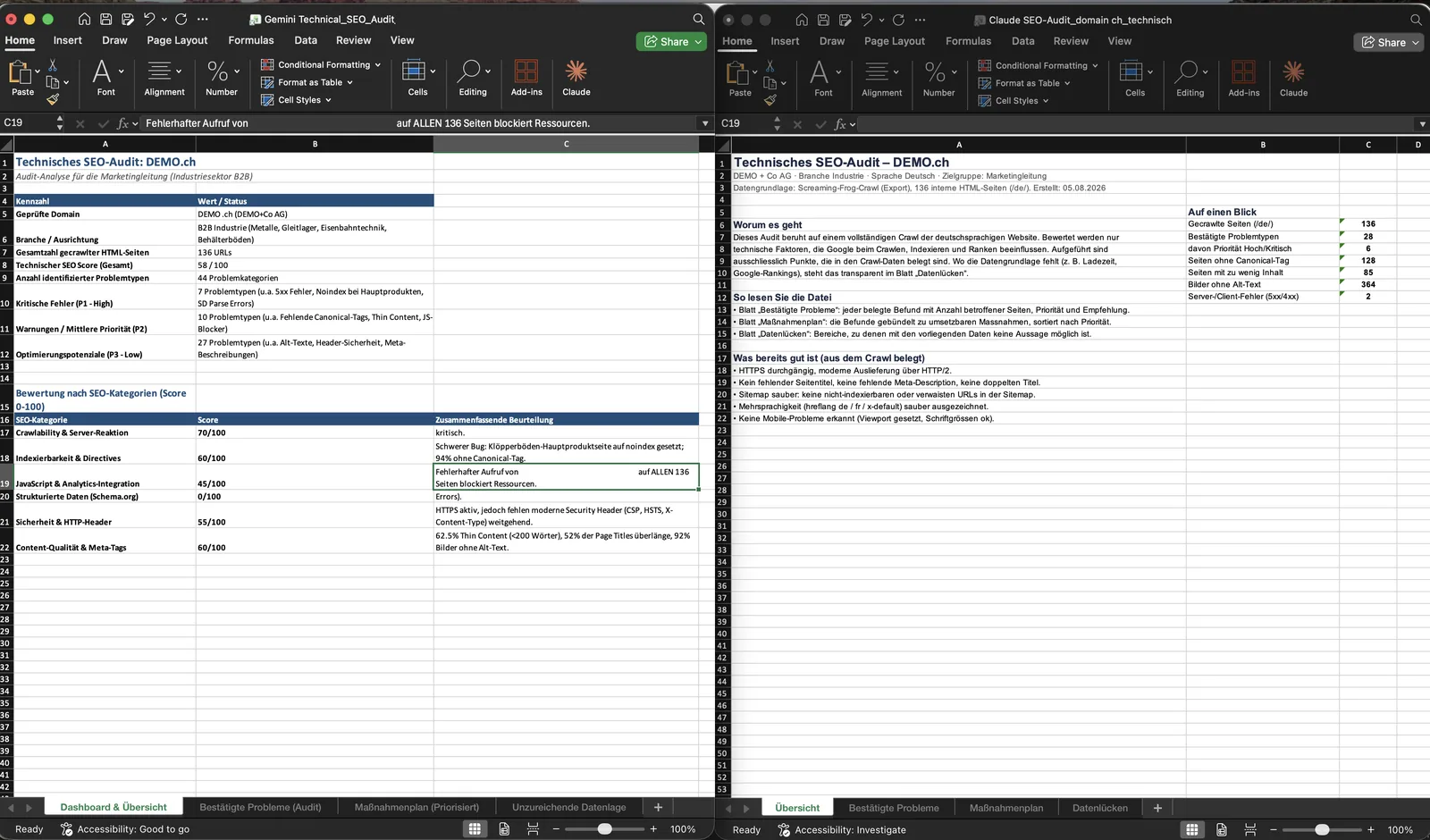
The two profiles read like this. The first model deduplicates the raw signals better and delivers a more compact plan (30 rows bundled into 16 tasks), but it leans toward dangerous direct fixes: delete the Contao graph, fill alt texts centrally in the media library. The second model keeps more technical caveats in the detail rows, especially for alt texts, multiple H1, and the 200-word mark, but it loses those caveats in the executive summary and invents business consequences there that the crawl data doesn’t support: zero organic leads, a GDPR breach, a “Google Security Scoring” that doesn’t exist like that.
Especially instructive is the recurring failure mode of the second run: the correct caveat sits in the long row and vanishes when it’s compressed into the dashboard. On the 200-word mark it copies the Screaming Frog explanation almost word for word in the detail row (default threshold, no real minimum, only a rough guide) and then in the plan says “Google rates thin pages as low quality.” Two statements that contradict each other, in the same file.
The other way round, the first run has weaknesses the second doesn’t. It declares hreflang clean in the overview, though the French version wasn’t in the crawl at all, and calls the sitemap clean while its own table carries a 500 page in that sitemap. The second run did pick up the hreflang signal. On the priority of the dev-resource finding, though, the first run was clearly closer to right: a config leftover is low, not a P1 GDPR case across every page.
You can’t crown a reliability winner from this. One gives the more manageable structure and the riskier CMS interventions, the other the better caveats in the detail and the more baseless business numbers in the summary. Both files carry the same status before release: needs expert validation. What differs isn’t the readiness for release, it’s the kind of error a human has to look for first.
Reproducibility: where the evidence sits in the workbooks
So this stays verifiable and doesn’t end at my say-so, here are the addresses instead of retellings. Anyone with both workbooks can trace the comparison cell by cell.
| Claim | First model (sheet!range) | Second model (sheet!range) |
|---|---|---|
| 200-word mark | Confirmed problems!A8:H8; Action plan!A5:F5 | Confirmed problems!A22:J22; Dashboard!A22:C22; Action plan!A9:I9 |
| 128 without canonical | Confirmed problems!A3:H3; Action plan!A4:F4 | Confirmed problems!A18:J18; Dashboard!A18:C18 |
| Contao JSON-LD | Confirmed problems!A23:H23; Action plan!A10:F10 | Confirmed problems!A19:J19; Dashboard!A20:C20 |
| 364 images without alt | Confirmed problems!A19:H19; Action plan!A6:F6 | Confirmed problems!A11:J11; Action plan!A10:I10 |
| Noindex and business effect | Confirmed problems!A4:H4; Action plan!A11:F11 | Confirmed problems!A6:J6; Insufficient data!A1:E7 |
| Overall score | not calculated | Dashboard!A1:C22 (58/100 with no formula) |
What this matrix doesn’t prove: which model actually produced which file (no run metadata in the workbooks), how stable the result is across repeats, and the actual SEO effect of the findings. For that you need GSC, analytics, server logs, and a look into the Contao template. The comparison shows the behaviour of two artifacts on identical input, not the superiority of one model family.
That’s the lesson for evaluation: you don’t measure the reliability of an AI audit by the number of issues found. More useful are the share of signals correctly separated from real errors, the share of recommendations with a demonstrated effect, the number of contradictions between detail view and summary, and the amount of human review before a task goes into production. By those measures both runs need the human in the loop.
Conclusion
Claude doesn’t replace a technical SEO. It speeds up gathering, ordering, and formatting the data, and that can be worth a lot. But the quality of an audit doesn’t come from where the most findings are produced. It comes from the layer that checks causality, fills priorities with business context, and has the nerve to write “the data isn’t sufficient for that.” The best AI auditor isn’t the one that finds the most. The better one shows where every number comes from, sits with uncertainty, and stays quiet where the ground is missing.
Two models and one cost calculation lead to the same point: what counts is the review behind it, not the number of findings.
FAQ
Does Google penalise AI-generated audits or content? No. This isn’t about a Google penalty, it’s about consulting quality. The risk is that you sell a client an unproven cause as a fact.
Can Claude crawl Screaming Frog itself? Not in this setup. I crawled in Screaming Frog, exported the CSV, and handed the folder to Claude in Cowork. The crawling stays with the tool, a human checks the interpretation.
What’s the single most important control point? Give every finding a truth status (confirmed, hypothesis, data gap, conflict) before you assign it a priority. Most of the errors above vanish from that alone.
Is word count enough to spot thin content? No. A low word count is a review signal, not a finding. Without search intent, page type, and Search Console data, “too thin” is a guess.
Sources and status
Research and case from 5 August 2026. The audit case comes from my own run over the website of a Swiss industrial company (Contao CMS), anonymised. The numbers (136 pages, 85 short pages, 128 without a canonical, 364 images without alt, 136 pages with a parse error) come from the model output of that run.
- Google, Creating helpful, reliable, people-first content
- Google, Consolidate duplicate URLs / Canonical
- Google, Control your snippets
- Google, Image SEO best practices
- Google, Understanding page experience
- Google, Structured data general guidelines
- Screaming Frog, Structured Data: Parse Errors
- Screaming Frog, Structured Data (tabs/filters)
- W3C, JSON-LD 1.1
- Schema.org, Markup Validator: limitations
- Google, Rich Results Test (help)
- JSON-LD Playground
- Contao, JSON-LD context and core source: ContaoPageSchema.php, DefaultIndexer.php, SearchIndexListener.php
- W3C WAI, Images Tutorial: Decorative, Functional, Informative, Complex
- OWASP, HTTP Security Response Headers Cheat Sheet
- Screaming Frog, Low Content Pages (default threshold 200 words)
- Google, SEO Starter Guide (no minimum or maximum length)
- Google, Structured data is not a generic ranking factor